Dear Readers: PWNSCAR is planning to publish a monthly Tech Magazine along with some other blogs. To Contribute CHECK DETAILS

This is default featured slide 1 title

Go to Blogger edit html and find these sentences.Now replace these sentences with your own descriptions.This theme is Bloggerized by Lasantha Bandara - Premiumbloggertemplates.com.

This is default featured slide 2 title

Go to Blogger edit html and find these sentences.Now replace these sentences with your own descriptions.This theme is Bloggerized by Lasantha Bandara - Premiumbloggertemplates.com.

This is default featured slide 3 title

Go to Blogger edit html and find these sentences.Now replace these sentences with your own descriptions.This theme is Bloggerized by Lasantha Bandara - Premiumbloggertemplates.com.

This is default featured slide 4 title

Go to Blogger edit html and find these sentences.Now replace these sentences with your own descriptions.This theme is Bloggerized by Lasantha Bandara - Premiumbloggertemplates.com.

ITS ALL ABOUT TECHNOLOGY

You will be left behind the race if you are lacking in technology. You wont be able to survive with respect. So lets learn a bit about technology. Shall we !

ABOUT ME

Showing posts with label joomla. Show all posts

11 Jun 2012

Uploading Shell in Joomla

Hey all today i will be telling you all about uploading shell in joomla.

So without wasting time lets start our work____!!! 

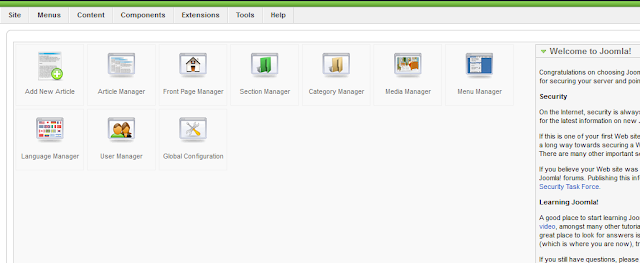
1. Suppose we have an access to joomla admin.


2. After logging in we will get inside the site from where we can edit and do many things with the database. As shown in image below.


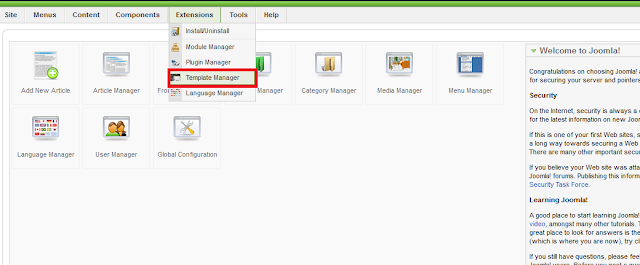
 3. The go to Extensions and inside that Template Manage. As shown in below image.


4. After getting in template manager we will see all the templates installed on the site.
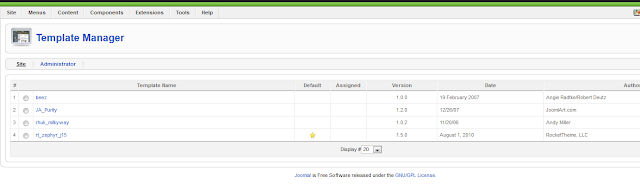


5. As we can see marking in red it has the star. It shows its the default template used by the sites currently. Select any of the template like i am taking beez.


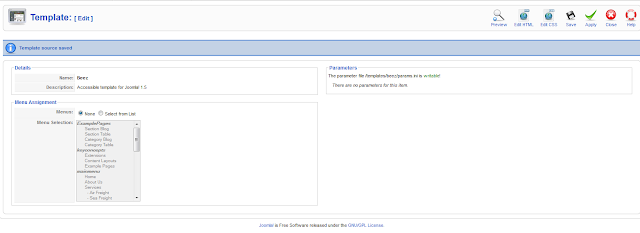
6. Once we click on beez we will see something as shown in below image.
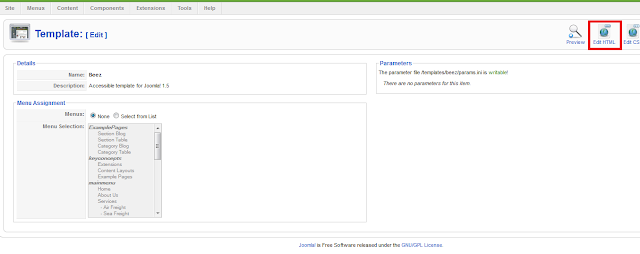


After that click on Edit html.

7. Once you clicked on edit html you will see something as shown in below image.
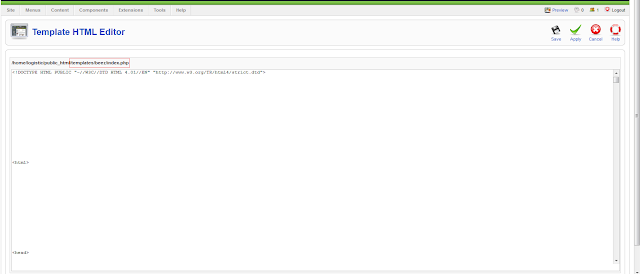


As we can see the red part /templates/beez/index.php that is the path of your shell.

9. Now paste your shell code over there and save it.
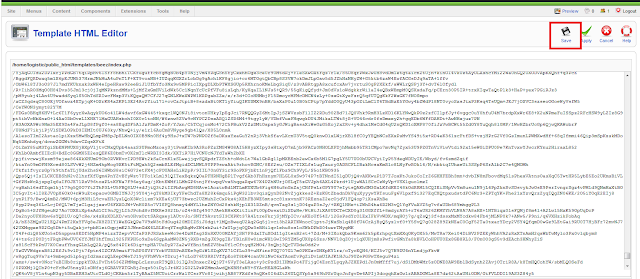


 10. As soon as we  click on save. it will take us to page were it will shows Template source saved


Once that is done we can access our shell. Path of the shell would be


www.site.com/templates/beez/index.php 


  I hope you all enjoyed this tutorial and if u feel any confusion or problem then you may ask in comments. 

5 Jun 2012

Hacking Joomla Website

Hey all today i will tell you all how to hack joomla websites.Ok so thereare are different ways to hack a Joomla based website ...But today i will tell you all one of the finest way to hack Joomla websites.


Introduction To Joomla


Joomla as Stable-Full Package is probably unhackable and If someone tells that HACKED Joomla, talking rubbish___!!!!!!!

But people still hacked sites that use Joomla as Content Management System?

Joomla is made of components and modules and there are some developers apart from official team that offer their solutions to improve Joomla. That components and modules made by that other developers are weak spots and thus make it vulnerable and hackable.

Finding Exploit and Target


First Of all you input this

Google Dork :

inurl:"option=com_mytube"

enter this dork in Google search box...

Next is injecting the target

See for this URL:

http://targetsite.com/index.php?option=com_mytube&Itemid=88...

Now You have to replace the url something like below

http://targetsite.com/index.php?option=com_mytube&Itemid=88&view=videos&type=member&user_id=62+AND+1=2+UNION+SELECT+0,1,2,3,4,5,6,7,8,9,10,11,concat%280x3a,username,0x3a,email,0x3a,activation%29,13,14,15,16,17,18,19,20,21,22,23,24,25+from+jos_users+where+id=62--
If our target site is vulnerable then we can see something like below image


In above image we can see username, email and activation code.

Now let this page opened and open new page.

Admin password reset


Go to:

http://www.targetsite.com/index.php?option=com_user&view=reset

This is standard Joomla query for password reset request


Ok now type the email adress found in above steps and submit it
The activation code should be resetted.

Return to the first page, refresh the page and take the new activation code.

Paste him in the token and press Submit.

problem with token_______!!!!!!

UPDATE: Joomla! 1.5.16 now hashes the reset token

if you see a thing like :$1$14411: after the activation code, it will not work.

Admin Login


If you done everything ok, your Password page will load. Enter your new password...


After that go to:

http://www.targetsite.com/administrator/


Standard Joomla portal content management system

Enter the username  and your new password, click on Login

Go to Extensions >> Template Manager >> Default Template Name >> Edit HTML

In Template HTML Editor insert your defaced code, click Apply, Save and you are done!!!

Now you are successfully done.


  I hope you all enjoyed this tutorial and if u feel any confusion or problem then you may ask in comments.